What's New in Claude Code 2.1
Recent Claude Code releases, newest first. Verified against the official changelog. Last reviewed October 13, 2026.
v2.1.296Oct 9, 2026NEWCLAUDE_CODE_WORKFLOW_SUBAGENT_MODEL runs every workflow agent on one model; autoCompactWindow in subagent frontmatter; MCP tool description limit raised from 2,048 to 4,096 chars.
v2.1.295Oct 8, 2026NEWonFailure: "block" for command and HTTP hooks (a failing hook blocks the action); OSC 7501 lets terminals show whether Claude is working, waiting or done.
v2.1.293Oct 7, 2026NEWClaude Haiku 5.5 (claude-haiku-5-5) is the new default Haiku - 1M context, $0.10/$0.50 per Mtok.
v2.1.284Sep 28, 2026Claude Sonnet 5.5 (claude-sonnet-5-5) is the new default Sonnet - 1M context. Ultracode becomes its own toggle in /effort and no longer forces xhigh.
v2.1.280Sep 22, 2026Claude Opus 5.5 (claude-opus-5-5) is the new default Opus - 1M context, $4/$20 per Mtok.
v2.1.261Sep 4, 2026/skill-doctor shows which loaded skills go unused and what they cost in context.
v2.1.257Sep 1, 2026Claude Fable 5.1 (claude-fable-5-1) is the new default Fable; CLAUDE_CODE_SUBAGENT_MODEL_FORCE puts every subagent on one model.
v2.1.248Aug 27, 2026--restricted mode strips the built-in tools that run commands or code, for eval harnesses on shared machines.


Building with Claude? Get paid for it.
Forward Deployed Engineers ship AI agents inside real customer systems. Open roles at Anthropic, OpenAI, Cognizant and more.
Getting Started
Install via curl (macOS/Linux)
Recommended installation method
curl -fsSL https://claude.ai/install.sh | bashInstall via Homebrew
Install using Homebrew on macOS
brew install --cask claude-codeInstall via PowerShell (Windows)
Install on Windows using PowerShell
irm https://claude.ai/install.ps1 | iexInstall via npm
Install globally using npm (requires Node.js 18+)
npm install -g @anthropic-ai/claude-codeStart Claude Code
Launch Claude Code in your project
cd your-project && claudeUpdate to Latest
Keep Claude Code up to date
claude updateModels & Effort
🧠 Model Aliases (October 2026)
Select with /model <alias>, claude --model <alias>, the ANTHROPIC_MODEL env var, or the model setting. Append [1m] for the 1M-token context window (e.g. opus[1m]).
fableclaude-fable-5-1Flagship for your hardest, longest-running tasks.
opusclaude-opus-5-5Complex reasoning & architecture. 1M context native.
sonnetclaude-sonnet-5-5Daily coding. 1M context native.
haikuclaude-haiku-5-5Fast & cheap for simple, scoped tasks. 1M context.
best→ fable, else opusFable where available to you, otherwise Opus.
opusplanOpus → SonnetOpus in plan mode, Sonnet for execution.
🎚️ Effort Levels - /effort <level>
lowShort, latency-sensitive tasks that aren't intelligence-sensitive.
mediumCost-sensitive work that can trade off some intelligence.
highBalanced token usage & intelligence - the standard default.
xhighDeeper reasoning at higher token spend.
maxDeepest reasoning; can overthink. Session-only.
ultracodeSeparate toggle (Tab in /effort, or /effort ultracode on): Claude orchestrates dynamic workflows. Works at any effort level.
ultrathink anywhere in your prompt - no session change "effortLevel": "high" in settings.json (only low/medium/high/xhigh persist) /fast on or ⌥O - faster Opus output, not a smaller model Keyboard Shortcuts
Configuration
📁 Settings File Locations (Priority Order)
/etc/claude-code/managed-settings.json (highest priority; drop-in fragments go in managed-settings.d/) --settings <file>, flags (this session only) .claude/settings.local.json (personal, git-ignored) .claude/settings.json (team settings) ~/.claude/settings.json (personal defaults) ~/.claude.json (OAuth, user MCP servers, state) and .mcp.json (project MCP servers, commit it). Open settings
Theme, model, output style & more (alias /settings)
/configSet a value directly
Skip the UI; works in -p mode too
/config theme=dark model=sonnetPermissions
View or update allow / ask / deny rules
/permissionsStatus line
Describe it, or auto-configure from your shell prompt
/statuslineKeyboard shortcuts
Open your keybindings file
/keybindingsPer-session settings
Load a settings file (or inline JSON) for one run
claude --settings ./ci-settings.json🔑 Key Settings (settings.json)
model / effortLevelDefault model and persisted effort levelfallbackModelBackup models, tried in order when the primary is overloadedmodelPickerCurate the /model picker: your own models, labels and ordermodelOverridesMap Anthropic model IDs to provider IDs (e.g. Bedrock ARNs)autoModeYour own allow / block rules for the auto-mode classifiershowThinkingSummariesShow thinking summaries when you expand with Ctrl+O (off by default)axScreenReaderPlain-text, screen-reader friendly renderingworktree.sparsePathsSparse-checkout only the dirs you need for --worktreeenvEnvironment variables applied to every sessionhooks / permissionsLifecycle hooks and allow / ask / deny rules (see below)CLI Commands & Flags
Run claude --help for the full list. Most flags work in both interactive and --print mode.
claudeStart an interactive sessionclaude "query"Start with an initial promptclaude -p / --printHeadless: run via SDK and exitclaude -c / --continueContinue the most recent conversation hereclaude -r / --resume "<session>"Resume a session by ID or name (picker if none)claude updateUpdate to the latest versionclaude auth loginSign in (--sso to force SSO, --console for API billing)claude agentsAgent view: monitor & dispatch parallel background sessionsclaude ultrareview [target]Non-interactive deep cloud code review of a PR / branchclaude plugin init <name>Scaffold a new pluginclaude purge [path]Delete all local Claude Code state for a projectclaude -n / --name <name>Name the session (shows on the prompt bar)claude --model <alias>Set the model (fable/opus/sonnet/haiku/id)claude --effort <level>Set effort: low/medium/high/xhigh/maxclaude --agent <name>Run the session as a specific subagentclaude --fallback-model <m>Auto-fallback model(s) when primary is overloadedclaude --safe-modeDisable CLAUDE.md, skills, MCP, hooks for troubleshooting (v2.1.169+)claude --permission-mode <m>default/acceptEdits/plan/auto/dontAsk/bypassPermissionsclaude --dangerously-skip-permissionsSkip all permission prompts ⚠️claude --add-dir <path>Grant access to extra working directoriesclaude --output-format <fmt>Print mode: text / json / stream-jsonclaude --allowedTools <list>Pre-approve tools (no prompts)claude --disallowedTools <list>Remove tools, or deny scoped calls like Bash(rm *)claude --restrictedStrip tools that run commands or code (eval harnesses)claude --append-system-prompt <txt>Append text to the default system promptclaude --system-prompt <txt>Replace the entire system promptclaude --json-schema <schema>Validated JSON output matching a schema (print mode)claude --max-turns <n>Cap agentic turns (print mode)claude --max-budget-usd <n>Stop after spending this much (print mode)claude --cloud "<task>"Start a web session on claude.ai (--remote is the old name)claude --teleportPull a cloud session into your local terminalclaude --from-pr <PR>Resume sessions linked to a PR (GitHub / GitLab / Bitbucket)claude --resume <id> --fork-sessionResume as a new session ID (branch off)claude --debug='mcp,startup'Debug logging, optionally filtered by categoryclaude --bg --exec '<cmd>'Run a shell command as a background agent (v2.1.154+)claude -w / --worktree <name>Start in an isolated git worktreeclaude --mcp-config <file>Load MCP servers from JSON file(s)claude --settings <file>Load settings JSON (or inline string)claude mcp add ...Add an MCP server (see MCP section)claude doctorDiagnose installation & configurationEnvironment Variables
Set in your shell or in the env key of settings.json. Common ones for auth, model selection, thinking budget, and feature toggles.
ANTHROPIC_API_KEYAPI key for direct authenticationANTHROPIC_MODELDefault model (overridden by --model)ANTHROPIC_DEFAULT_OPUS_MODELPin what the 'opus' alias resolves toANTHROPIC_DEFAULT_SONNET_MODELPin what the 'sonnet' alias resolves toANTHROPIC_DEFAULT_HAIKU_MODELPin 'haiku' (also used for background tasks)ANTHROPIC_DEFAULT_FABLE_MODELPin what the 'fable' alias resolves toANTHROPIC_CUSTOM_MODEL_OPTIONAdd a custom model entry to the /model pickerANTHROPIC_BETASExtra anthropic-beta headers (comma-separated)CLAUDE_CODE_SUBAGENT_MODELDefault model for subagents & workflow agentsCLAUDE_CODE_SUBAGENT_MODEL_FORCE=1 forces one model onto every subagentCLAUDE_CODE_WORKFLOW_SUBAGENT_MODELRun every workflow agent on one modelANTHROPIC_BASE_URLOverride the API endpoint (proxy/gateway)CLAUDE_CODE_EFFORT_LEVELSet effort: low/medium/high/xhigh/max/autoMAX_THINKING_TOKENSMax extended-thinking tokens (0 = off)ENABLE_PROMPT_CACHING_1HOpt into the 1-hour prompt-cache TTLCLAUDE_CODE_SAFE_MODEEnable safe mode (same as --safe-mode)CLAUDE_CODE_ENABLE_AUTO_MODEEnable auto mode on Bedrock/Vertex/FoundryCLAUDE_CODE_DISABLE_1M_CONTEXTTurn off the 1M-token context windowCLAUDE_CODE_DISABLE_CRONDisable scheduled tasksCLAUDE_CODE_DISABLE_WEB_FETCH=1 turns off WebFetch (WebSearch stays)CLAUDE_CODE_ENABLE_AWAY_SUMMARYForce session recap on (1) or off (0)CLAUDE_CODE_DISABLE_MOUSE_CLICKS=1 disables click/drag/hover in fullscreen, keeps wheel scrollCLAUDE_AX_SCREEN_READER=1 renders flat, screen-reader friendly outputDISABLE_UPDATES=1 blocks all updates, even manual (stricter than DISABLE_AUTOUPDATER)CLAUDE_CODE_PACKAGE_MANAGER_AUTO_UPDATE=1 auto-upgrades Homebrew / WinGet installsCLAUDE_CODE_CERT_STORETLS CA sources: bundled, systemCLAUDE_CODE_USE_BEDROCKRoute requests through AWS BedrockCLAUDE_CODE_USE_VERTEXRoute requests through Google Vertex AIBASH_DEFAULT_TIMEOUT_MSDefault timeout for bash commands (def. 120000)MCP_TIMEOUTMCP server startup timeout (ms)DISABLE_TELEMETRYDisable telemetry collectionCLAUDECODESet to 1 inside Claude Code subprocessesCLAUDE_CODE_SESSION_IDCurrent session ID in Bash, hook & MCP subprocessesMemory & Files
📁 CLAUDE.md Locations (loaded every session)
./CLAUDE.md or ./.claude/CLAUDE.md./CLAUDE.local.md~/.claude/CLAUDE.md/etc/claude-code/CLAUDE.md/init
Generate a starter CLAUDE.md from your codebase.
/memory
Edit CLAUDE.md files, toggle auto-memory, and view entries.
@import syntax
Pull files into CLAUDE.md: See @README and @package.json (max 4 hops).
Path-scoped rules
Put rules in .claude/rules/*.md (or ~/.claude/rules/*.md for all projects) with a paths: frontmatter glob - they load only when matching files are read.
Auto-memory
Claude's own persistent notes live in ~/.claude/projects/<proj>/memory/; MEMORY.md loads at startup (first 200 lines / 25KB).
/doctor prompt-audit
Audit your CLAUDE.md and instructions for stale or conflicting guidance.
Keep it lean
Aim for under ~200 lines - long CLAUDE.md files eat context and reduce adherence.
Checkpointing - Undo & Rewind
⏮️ Automatic Safety Net
Claude Code automatically tracks all file edits, letting you quickly rewind to previous states if changes go wrong.
⌨️ Rewind Commands
Esc+EscOpen rewind menu to restore previous states/rewindOpen rewind menu via slash command✨ Rewind Options
Automatic Tracking
Every user prompt creates a new checkpoint
Conversation Rewind
Restore to previous user message while keeping code
Code Rewind
Revert file changes while keeping conversation
Full Rewind
Restore both code and conversation to prior state
⚠️ Limitations
Slash Commands - Interactive Session Control
⚡ Interactive Session Commands
Control Claude's behavior during interactive sessions. Type commands directly in the Claude Code chat interface.
📋 Built-in Commands
/clearStart a fresh conversation (keeps project memory)/compact [focus]Summarize the conversation to free context/resume [session]Resume a conversation by ID or name/branch [name]Fork the conversation at this point (alias /fork)/rewindRewind code and/or conversation (Esc Esc). Aliases /undo, /checkpoint/context [all]Visualize context-window usage/export [file]Export the conversation as text/copy [N]Copy the last (or Nth) response to clipboard/recapOne-line summary of the session so far/btw <question>Ask a side question without bloating history/rename [name]Rename the session (auto-names it if blank)/focusFocus view: just your prompt, a tool summary & the answer/tasksView & manage background work (alias /bashes)/model [model]Switch model (picker; ← → adjusts effort)/effort [level]Set reasoning effort: low/medium/high/xhigh/max/fast [on|off]Toggle fast mode (faster Opus output)/plan [desc]Enter plan mode/goal [condition]Keep working until a condition is met/code-review [effort] [--fix]Review the diff for bugs + cleanups; --fix applies them, --max-findings <n>|all/code-review ultra [PR]Deep multi-agent review in a cloud sandbox (alias /ultrareview)/simplify [target]Cleanup-only review (no bug hunting)/security-reviewScan the diff for security vulnerabilities/review [PR]Alias of /code-review/runLaunch & drive your app to confirm a change works/verifyConfirm a code change behaves as intended/diffInteractive diff viewer/loop [interval] [prompt]Run a prompt on a recurring interval (alias /proactive)/workflowsView & manage background multi-agent workflow runs/batch <instruction>Decompose a large change across parallel worktrees/schedule [desc]Create a scheduled cloud agent (cron routine)/config [key=value]Open settings, or set a value directly (alias /settings)/themeColor theme, incl. auto (match terminal) & custom themes/color [color]Set the prompt-bar color for this session/statuslineConfigure the status line/keybindingsOpen your keyboard shortcuts file/terminal-setupInstall Shift+Enter for newlines in your terminal/scroll-speedAdjust mouse-wheel scroll speed (fullscreen)/permissionsView or update tool permissions/mcpManage MCP servers & OAuth authentication/agentsReminder to ask Claude to create subagents, or edit .claude/agents//hooksConfigure lifecycle hooks/memoryEdit CLAUDE.md & toggle auto-memory/initGenerate a starter CLAUDE.md/cd <path>Move the session to a new working directory (v2.1.169+)/add-dir <path>Add an extra working directory/skillsList available skills/reload-skillsRe-scan skills without restarting/skill-doctorFind unused skills and what they cost in context/debug [desc]Turn on debug logging and troubleshoot from the log/claude-apiLoad Claude API & Agent SDK reference (migrate, cost-optimize...)/ideManage IDE integrations and show status/pluginManage plugins (install/enable/disable)/voiceToggle push-to-talk voice dictation/statusShow version, model, account & connectivity/usageCost, plan limits & activity stats (aliases /cost, /stats)/usage-creditsAdd usage credits when you hit a limit (was /extra-usage)/insightsHTML report on how you use Claude Code/doctor [prompt-audit]Setup checkup with fixes (alias /checkup); prompt-audit checks CLAUDE.md/release-notesBrowse the changelog by version/desktopContinue this session in the Desktop app (alias /app)/loginSign in / switch Anthropic accounts/helpShow available commands/feedback [report]Send product feedback (same dialog as /bug)🎯 Custom Slash Command Templates
Basic Project Command
Create a simple project-specific command
Analyze this code for performance issues and suggest optimizations:Personal Command
Create a user-wide command available in all projects
Review this code for security vulnerabilities:Command with All Arguments
Use $ARGUMENTS placeholder for all arguments
Fix issue #$ARGUMENTS following our coding standardsCommand with Positional Arguments
Use $1, $2, $3 for individual arguments
---
argument-hint: [pr-number] [priority] [assignee]
description: Review pull request with priority and assignee
---

Review PR #$1 with priority $2 and assign to $3.
Focus on security, performance, and code style.
Git Commit Command
Advanced command with bash execution and file references
---
allowed-tools: Bash(git add:*), Bash(git status:*), Bash(git commit:*)
argument-hint: [message]
description: Create a git commit
---

## Context

- Current git status: !`git status`
- Current git diff: !`git diff HEAD`
- Current branch: !`git branch --show-current`
- Recent commits: !`git log --oneline -10`

## Your task

Based on the above changes, create a single git commit.
Command with Model Override
Specify model and disable automatic invocation
---
description: Perform deep code analysis
model: opus
disable-model-invocation: true
---

Perform a comprehensive analysis of this codebase focusing on:
- Architecture patterns
- Potential scalability issues
- Security vulnerabilities
- Performance bottlenecks
💡 Usage Tips
.claude/commands/ (shared with team) ~/.claude/commands/ (available across all projects) $ARGUMENTS placeholder for dynamic values !`command` to run commands before processing @filename to include file contents /mcp__server__prompt_nameHeadless Mode - Programmatic Usage
🤖 Run Claude Code Non-Interactively
Use --print (or -p) for automation, scripts, and CI/CD pipelines. Perfect for SRE bots, automated code reviews, and agent integrations.
📋 Key Headless Commands
claude -p "query"Non-interactive mode, print result and exitclaude -p --output-format json "query"Output in JSON format with metadataclaude -p --output-format stream-json "query"Stream JSON messages as they arriveclaude -c -p "query"Continue most recent conversation non-interactivelyclaude --resume <id> -p "query"Resume specific session non-interactivelyecho "query" | claude -pProcess piped inputclaude --verbose -p "query"Enable verbose logging for debuggingclaude --max-turns 3 -p "query"Limit agentic turns in non-interactive mode💼 Real-World Examples
SRE Incident Response
Automated incident investigation
claude -p "Analyze these errors" \
  --append-system-prompt "You are an SRE expert" \
  --output-format json \
  --allowedTools "Bash,Read,mcp__datadog"
Security Audit
Automated PR security review
gh pr diff 123 | claude -p \
  --append-system-prompt "You are a security engineer" \
  --output-format json \
  --allowedTools "Read,Grep" > audit.json
Multi-turn Session
Maintain context across multiple commands
session_id=$(claude -p "Start review" --output-format json | jq -r '.session_id')
claude --resume "$session_id" -p "Check compliance"
claude --resume "$session_id" -p "Generate summary"
📊 Output Formats
Agent Skills - Modular Capabilities
🧠 What are Agent Skills?
Skills are modular capabilities that extend Claude's functionality. Unlike slash commands (user-invoked), Skills are model-invoked-Claude autonomously uses them based on context.
.claude/skills/ (project) or ~/.claude/skills/ (personal) 📋 Skill Setup Commands
mkdir -p .claude/skills/skill-nameCreate project Skill directorymkdir -p ~/.claude/skills/skill-nameCreate personal Skill directorycat > .claude/skills/my-skill/SKILL.mdCreate Skill definition file🎯 Skill Templates
Simple Skill
Basic Skill with single file
---
name: generating-commit-messages
description: Generates clear commit messages from git diffs. Use when writing commit messages or reviewing staged changes.
---

# Generating Commit Messages

## Instructions

1. Run `git diff --staged` to see changes
2. I'll suggest a commit message with:
   - Summary under 50 characters
   - Detailed description
   - Affected components

## Best practices

- Use present tense
- Explain what and why, not how
Skill with Tool Permissions
Skill that limits tool access
---
name: code-reviewer
description: Review code for best practices and potential issues. Use when reviewing code, checking PRs, or analyzing code quality.
allowed-tools: Read, Grep, Glob
---

# Code Reviewer

## Review checklist

1. Code organization and structure
2. Error handling
3. Performance considerations
4. Security concerns
5. Test coverage
🧾 SKILL.md Frontmatter
descriptionWhat it does + when to use it - drives auto-invocationallowed-toolsTools usable without asking while the skill runsdisallowed-toolsTools removed while the skill is activedisable-model-invocationtrue = only you can trigger it with /nameuser-invocablefalse = hide from the / menu, Claude-onlyargument-hintAutocomplete hint, e.g. [issue-number]model / effortOverride model or effort while the skill runscontext: forkRun in a forked subagent (pick it with agent:)pathsGlobs - auto-load only when working with matching fileshooksHooks registered when the skill is invoked🔣 Skill Variables & Injection
$ARGUMENTSEverything typed after /skill-name$0, $1 ...Individual arguments (0-based)${CLAUDE_SKILL_DIR}The skill's own folder - reference bundled scripts${CLAUDE_PROJECT_DIR}Project root directory${CLAUDE_SESSION_ID}Current session ID${CLAUDE_EFFORT}Current effort level, to adapt instructions!`git diff HEAD`Runs the command and inlines its output before Claude reads the skill🔄 Skills vs Slash Commands
/command), simple prompts, single file Plugins - Extend Claude Code
🧩 What are Plugins?
Plugins extend Claude Code with custom commands, agents, hooks, Skills, and MCP servers. Install from marketplaces or create your own.
📋 Plugin Management Commands
/pluginOpen plugin management interface/plugin marketplace add <url-or-path>Add a plugin marketplace/plugin install <name>@<marketplace>Install a plugin from marketplace/plugin enable <name>@<marketplace>Enable a disabled plugin/plugin disable <name>@<marketplace>Disable a plugin without uninstalling/plugin uninstall <name>@<marketplace>Completely remove a plugin💡 Quick Start Examples
Add GitHub Marketplace
Add a plugin marketplace from GitHub
/plugin marketplace add your-org/claude-pluginsInstall Plugin
Install a specific plugin from marketplace
/plugin install formatter@your-orgScaffold Your Own Plugin
Create a new plugin skeleton
claude plugin init my-pluginLocal Development Marketplace
Add local marketplace for plugin development
/plugin marketplace add ./dev-marketplace✨ What Plugins Can Provide
MCP Servers & Extensions
🔌 Model Context Protocol (MCP)
Extend Claude Code with external tools and integrations. MCP servers provide additional capabilities like browser automation, database access, and API integrations.
📋 MCP Management Commands
claude mcp add <name> <command> [args...]Add MCP server with commandclaude mcp add --transport sse <name> <url>Add SSE transport MCP serverclaude mcp add --transport http <name> <url>Add HTTP transport MCP serverclaude mcp add -s project <name> ...Scope: local (default, you), project (.mcp.json, shared), user (all projects)claude mcp add -e KEY=value <name> -- <cmd>Pass env vars to a stdio server (-- separates the server command)claude mcp listList installed MCP serversclaude mcp remove <name>Remove MCP server/mcpManage servers & OAuth login in-session"alwaysLoad": trueServer config: load its tools up front instead of via tool search_meta["anthropic/maxResultSizeChars"]Server-side: raise one tool's output limitMAX_MCP_OUTPUT_TOKENSRaise the default 25K-token MCP output cap⚡ Popular MCP Integrations
Airtable
Read/write records, manage bases and tables
claude mcp add --transport stdio airtable --env AIRTABLE_API_KEY=YOUR_KEY -- npx -y airtable-mcp-serverAsana
Interact with your Asana workspace
claude mcp add --transport sse asana https://mcp.asana.com/sseAtlassian
Manage Jira tickets and Confluence docs
claude mcp add --transport sse atlassian https://mcp.atlassian.com/v1/sseBox
Access enterprise content and automate workflows
claude mcp add --transport http box https://mcp.box.com/Canva
Browse, summarize, autofill and generate Canva designs
claude mcp add --transport http canva https://mcp.canva.com/mcpClickUp
Task management, project tracking
claude mcp add --transport stdio clickup --env CLICKUP_API_KEY=YOUR_KEY --env CLICKUP_TEAM_ID=YOUR_TEAM -- npx -y @hauptsache.net/clickup-mcpCloudflare
Build apps, analyze traffic, manage security
claude mcp add --transport http cloudflare https://mcp.cloudflare.com/mcpCloudinary
Upload, manage, transform media assets
claude mcp add --transport http cloudinary https://mcp.cloudinary.com/mcpDaloopa
High quality fundamental financial data
claude mcp add --transport http daloopa https://mcp.daloopa.com/server/mcpFigma
Generate better code with full Figma context
claude mcp add --transport http figma https://mcp.figma.com/mcpFireflies
Extract insights from meeting transcripts
claude mcp add --transport http fireflies https://api.fireflies.ai/mcpGitHub
Manage repositories, PRs, and issues
claude mcp add --transport http github https://api.githubcopilot.com/mcp/HubSpot
Access and manage HubSpot CRM data
claude mcp add --transport http hubspot https://mcp.hubspot.com/anthropicHugging Face
Access Hugging Face Hub and Gradio apps
claude mcp add --transport http huggingface https://huggingface.co/mcpIntercom
Access customer conversations and tickets
claude mcp add --transport http intercom https://mcp.intercom.com/mcpinvideo
Build video creation capabilities
claude mcp add --transport sse invideo https://mcp.invideo.io/sseJam
Debug with AI agents accessing Jam recordings
claude mcp add --transport http jam https://mcp.jam.dev/mcpLinear
Issue tracking and project management
claude mcp add --transport http linear https://mcp.linear.app/mcpMonday
Manage monday.com boards and items
claude mcp add --transport http monday https://mcp.monday.com/mcpNetlify
Create, deploy, and manage websites
claude mcp add --transport http netlify https://netlify-mcp.netlify.app/mcpNotion
Read docs, update pages, manage tasks
claude mcp add --transport http notion https://mcp.notion.com/mcpPayPal
Payment processing and transaction management
claude mcp add --transport http paypal https://mcp.paypal.com/mcpPlaid
Banking data and financial account linking
claude mcp add --transport sse plaid https://api.dashboard.plaid.com/mcp/ssePlaywright
Advanced browser automation
claude mcp add --transport stdio playwright -- npx @playwright/mcp@latestPuppeteer
Browser automation
claude mcp add --transport stdio puppeteer -- npx -y @modelcontextprotocol/server-puppeteerSentry
Monitor errors, debug production issues
claude mcp add --transport http sentry https://mcp.sentry.dev/mcpSocket
Security analysis for dependencies
claude mcp add --transport http socket https://mcp.socket.dev/Square
Payments, inventory, orders, and more
claude mcp add --transport sse square https://mcp.squareup.com/sseStripe
Payment processing and subscriptions
claude mcp add --transport http stripe https://mcp.stripe.comStytch
Configure and manage authentication services
claude mcp add --transport http stytch http://mcp.stytch.dev/mcpSupabase
Database operations
claude mcp add --transport stdio supabase --env SUPABASE_ACCESS_TOKEN=YOUR_TOKEN -- npx -y @supabase/mcp-server-supabase@latestVercel
Manage projects, deployments, and logs
claude mcp add --transport http vercel https://mcp.vercel.com/Workato
Access applications, workflows, and data
claude mcp add --transport http workato https://mcp.workato.com/mcpZapier
Connect to 8,000+ apps
claude mcp add --transport http zapier https://mcp.zapier.com/mcpGit Worktrees - Parallel Development
🚀 Why Use Git Worktrees with Claude Code?
- No Context Loss: Each Claude session keeps full project understanding
- Parallel Work: Handle hotfixes while continuing feature development
- Safe Experiments: Test risky changes in complete isolation
- Model Comparison: Run different AI models on identical tasks
- Zero Switching Cost: No more git stash, checkout, restart cycle
📋 Essential Worktree Commands
claude -w / --worktree <name>Start Claude in a new worktree under .claude/worktrees/<name>claude --worktree <name> --resumeReturn to a worktree session you keptisolation: worktreeSubagent frontmatter: each run gets its own temporary worktreeworktree.sparsePathsSetting: sparse-checkout only the dirs you need (monorepos)/batch <instruction>Split a large change across parallel worktree agentsgit worktree add <path> <branch>Create worktree with existing branchgit worktree add <path> -b <branch> <start-point>Create worktree with new branchgit worktree listList all worktrees and their branchesgit worktree remove <path>Remove a worktree directorygit worktree pruneClean up worktree referencesgit worktree move <worktree> <new-path>Move worktree to new location💡 Powerful Workflow Examples
Parallel Feature Development
Work on multiple features simultaneously
git worktree add ../myapp-auth -b feature/auth main
git worktree add ../myapp-api -b feature/api main
cd ../myapp-auth && claude
cd ../myapp-api && claude
Hotfix While Developing
Handle urgent fixes without losing context
git worktree add ../myapp-hotfix -b hotfix/critical main
cd ../myapp-hotfix
claude "fix the critical bug"
# Original work continues in main directory
Safe Experiment Testing
Test risky changes in isolation
git worktree add ../myapp-experiment -b experiment/refactor main
cd ../myapp-experiment
claude "refactor the entire auth system"
# If it fails, just delete the directory
Model Comparison
Compare different AI implementations
git worktree add ../ml-sonnet -b experiment/sonnet main
git worktree add ../ml-opus -b experiment/opus main
cd ../ml-sonnet && claude --model sonnet
cd ../ml-opus && claude --model opus
Code Review Preparation
Polish code without affecting main work
git worktree add ../myapp-review -b review/cleanup feature-branch
cd ../myapp-review
claude "add docs, tests, and clean up code style"
git merge review/cleanup
Subagents - Specialized AI Assistants
🤖 Why Use Subagents?
- Context Preservation: Each subagent has separate context from main conversation
- Specialized Expertise: Fine-tuned prompts for specific domains and tasks
- Reusable Workflows: Share subagents across projects and with your team
- Tool Control: Grant specific tool access per subagent for security
- Automatic Delegation: Claude proactively uses appropriate subagents
📁 Subagent Locations
.claude/agents/ (highest priority, team shared) ~/.claude/agents/ (personal, all projects) 📋 Essential Subagent Commands
/agentsOpen subagents management interfaceclaude "Use the [name] subagent to..."Explicitly invoke a specific subagentmkdir -p .claude/agentsCreate project subagents directorymkdir -p ~/.claude/agentsCreate user subagents directory🎯 Ready-to-Use Subagent Templates
Code Reviewer
Expert code review after writing/modifying code
---
name: code-reviewer
description: Expert code review specialist. Proactively reviews code for quality, security, and maintainability. Use immediately after writing or modifying code.
tools: Read, Grep, Glob, Bash
model: inherit
---

You are a senior code reviewer ensuring high standards of code quality and security.

When invoked:
1. Run git diff to see recent changes
2. Focus on modified files
3. Begin review immediately

Review checklist:
- Code is simple and readable
- Functions and variables are well-named
- No duplicated code
- Proper error handling
- No exposed secrets or API keys
- Input validation implemented
- Good test coverage
- Performance considerations addressed

Provide feedback organized by priority:
- Critical issues (must fix)
- Warnings (should fix)
- Suggestions (consider improving)

Include specific examples of how to fix issues.
Debugger
Debugging specialist for errors and test failures
---
name: debugger
description: Debugging specialist for errors, test failures, and unexpected behavior. Use proactively when encountering any issues.
tools: Read, Edit, Bash, Grep, Glob
model: sonnet
---

You are an expert debugger specializing in root cause analysis.

When invoked:
1. Capture error message and stack trace
2. Identify reproduction steps
3. Isolate the failure location
4. Implement minimal fix
5. Verify solution works

Debugging process:
- Analyze error messages and logs
- Check recent code changes
- Form and test hypotheses
- Add strategic debug logging
- Inspect variable states

For each issue, provide:
- Root cause explanation
- Evidence supporting the diagnosis
- Specific code fix
- Testing approach
- Prevention recommendations

Focus on fixing the underlying issue, not just symptoms.
Data Scientist
Data analysis expert for SQL and BigQuery
---
name: data-scientist
description: Data analysis expert for SQL queries, BigQuery operations, and data insights. Use proactively for data analysis tasks.
tools: Bash, Read, Write
model: opus
---

You are a data scientist specializing in SQL and BigQuery analysis.

When invoked:
1. Understand the data analysis requirement
2. Write efficient SQL queries
3. Use BigQuery command line tools (bq) when appropriate
4. Analyze and summarize results
5. Present findings clearly

Key practices:
- Write optimized SQL queries with proper filters
- Use appropriate aggregations and joins
- Include comments explaining complex logic
- Format results for readability
- Provide data-driven recommendations

Always ensure queries are efficient and cost-effective.
💡 Usage Tips
"Use the code-reviewer subagent to check my code"@ and pick it from the typeahead, like a file SendMessage, keeping its context "Use debugger then optimizer subagents"📝 Subagent File Format
---
name: your-subagent-name
description: When this subagent should be invoked
tools: Read, Edit, Bash  # Optional - inherits all if omitted
---

Your subagent's system prompt goes here.
Include specific instructions, examples, and constraints.

Define the subagent's role, capabilities, and approach
to solving problems within its domain.
🤖 Built-in Subagents
ExploreRead-only file discovery & code search; skips CLAUDE.md to stay fastPlanRead-only codebase research for plan modegeneral-purposeAll tools - complex research, multi-step changes🧾 Subagent Frontmatter
name / descriptionRequired. Description tells Claude when to delegatetools / disallowedToolsAllow-list or remove tools (inherits all if omitted)modelsonnet / opus / haiku / fable / full ID / inheritpermissionModedefault, acceptEdits, auto, dontAsk, bypassPermissions, planisolation: worktreeRun in its own temporary git worktreememoryPersistent memory: user, project or localbackground: trueAlways run in the backgroundmaxTurnsCap agentic turns (output returned as partial)skills / mcpServersPreload skills; scope MCP servers to this agenteffortOverride effort level for this agentautoCompactWindowCompact earlier than the main conversationinitialPromptAuto-submitted first turn when run via --agentPermissions & Security
🔒 Ready-to-Use Permission Templates
Copy complete settings.json configurations for different security levels. Save to .claude/settings.json in your project.
⚠️ MCP Tool Permissions
mcp__github__* will NOT work "allow": ["mcp__github"]"allow": ["mcp__github__get_issue"]🏢 Enterprise Configuration
/etc/claude-code/managed-settings.json/etc/claude-code/managed-mcp.jsonallowedMcpServers and deniedMcpServersBasic Security
Block sensitive files, allow common dev commands
{
  "permissions": {
    "allow": [
      "Bash(npm run *)",
      "Bash(git status)",
      "Bash(git diff)",
      "Bash(git add *)",
      "Bash(git commit *)"
    ],
    "ask": [
      "Bash(git push:*)",
      "Bash(npm install *)"
    ],
    "deny": [
      "Read(./.env*)",
      "Read(./secrets/**)",
      "Read(./**/credentials*)",
      "Bash(rm -rf:*)",
      "Bash(curl:*)"
    ]
  }
}
Strict Security
Maximum security for sensitive projects
{
  "permissions": {
    "ask": [
      "Bash(*)",
      "Write(*)",
      "Edit(*)"
    ],
    "deny": [
      "Read(./.env*)",
      "Read(./secrets/**)",
      "Read(./config/**)",
      "Read(./**/credentials*)",
      "Read(./**/*.key)",
      "Read(./**/*.pem)",
      "WebFetch",
      "Bash(curl:*)",
      "Bash(wget:*)",
      "Bash(ssh:*)"
    ]
  }
}
Skill Permissions
Control which skills & slash commands Claude can invoke
{
  "permissions": {
    "allow": [
      "Skill(commit)",
      "Skill(review-pr *)"
    ],
    "deny": [
      "Skill(deploy *)"
    ]
  }
}
Enterprise MCP Restrictions
Example enterprise MCP server allowlist/denylist
{
  "allowedMcpServers": [
    {
      "serverName": "github"
    },
    {
      "serverName": "sentry"
    },
    {
      "serverName": "company-internal"
    }
  ],
  "deniedMcpServers": [
    {
      "serverName": "filesystem"
    }
  ]
}
Hooks - Automation & Control
⚠️ Security Warning
Hooks execute shell commands automatically with your credentials. Always review hook code before adding. Malicious hooks can damage your system or exfiltrate data.
Use hooks to automate formatting, logging, notifications, and custom permissions instead of relying on Claude to remember these tasks.
📋 Hook Events
SessionStartSession begins or resumes (load context, env setup)UserPromptSubmitPrompt submitted, before Claude processes itPreToolUseBefore a tool call runs - can block itPermissionRequestA tool call needs a permission decisionPermissionDeniedAuto mode denied a call - return retry: true to retryPostToolUseAfter a tool call succeedsPostToolUseFailureAfter a tool call failsNotificationClaude Code sends a notificationSubagentStartA subagent is spawnedSubagentStopA subagent finishesStopClaude finishes respondingStopFailureThe turn ended on an API errorInstructionsLoadedA CLAUDE.md or .claude/rules file loadsConfigChangeA settings file changes mid-sessionCwdChangedWorking directory changes (e.g. direnv-style setup)FileChangedA watched file changes on diskWorktreeCreateA worktree is created - replaces default git behaviorPreCompactBefore context compactionPostCompactAfter context compactionElicitationAn MCP server asks the user for inputSessionEndSession terminates🛠️ Hook Management Commands
/hooksOpen hooks configuration interfaceclaude --debugRun with debug output to see hook executionmkdir -p .claude/hooksCreate project hooks directorychmod +x .claude/hooks/script.shMake hook script executable🎯 Ready-to-Use Hook Examples
Auto Format Code
Run prettier on every file Claude edits (path arrives as JSON on stdin)
{
  "hooks": {
    "PostToolUse": [
      {
        "matcher": "Edit|Write",
        "hooks": [
          {
            "type": "command",
            "command": "jq -r '.tool_input.file_path' | xargs npx prettier --write"
          }
        ]
      }
    ]
  }
}
Desktop Notification
Get pinged when Claude needs your input (macOS)
{
  "hooks": {
    "Notification": [
      {
        "hooks": [
          {
            "type": "command",
            "command": "osascript -e 'display notification \"Claude Code needs your attention\" with title \"Claude Code\"'"
          }
        ]
      }
    ]
  }
}
🏗️ Hook Structure & Tips
~/.claude/settings.json (user) or .claude/settings.json (project) Bash, Edit|Write, *) $CLAUDE_PROJECT_DIR for relative paths 0=success, 2=block & show to Claude, other=error jq to parse) claude --debug to see hook execution details command, http, prompt, agent, mcp_tool"if": "Bash(git *)" runs the hook only when the call matches (permission rule syntax) "async": true for slow hooks (deploys, test suites) so Claude keeps working "onFailure": "block" blocks the action if the hook crashes or times out (default: continue) permissionDecision = allow / deny / ask / defer PDF & PNG Downloads
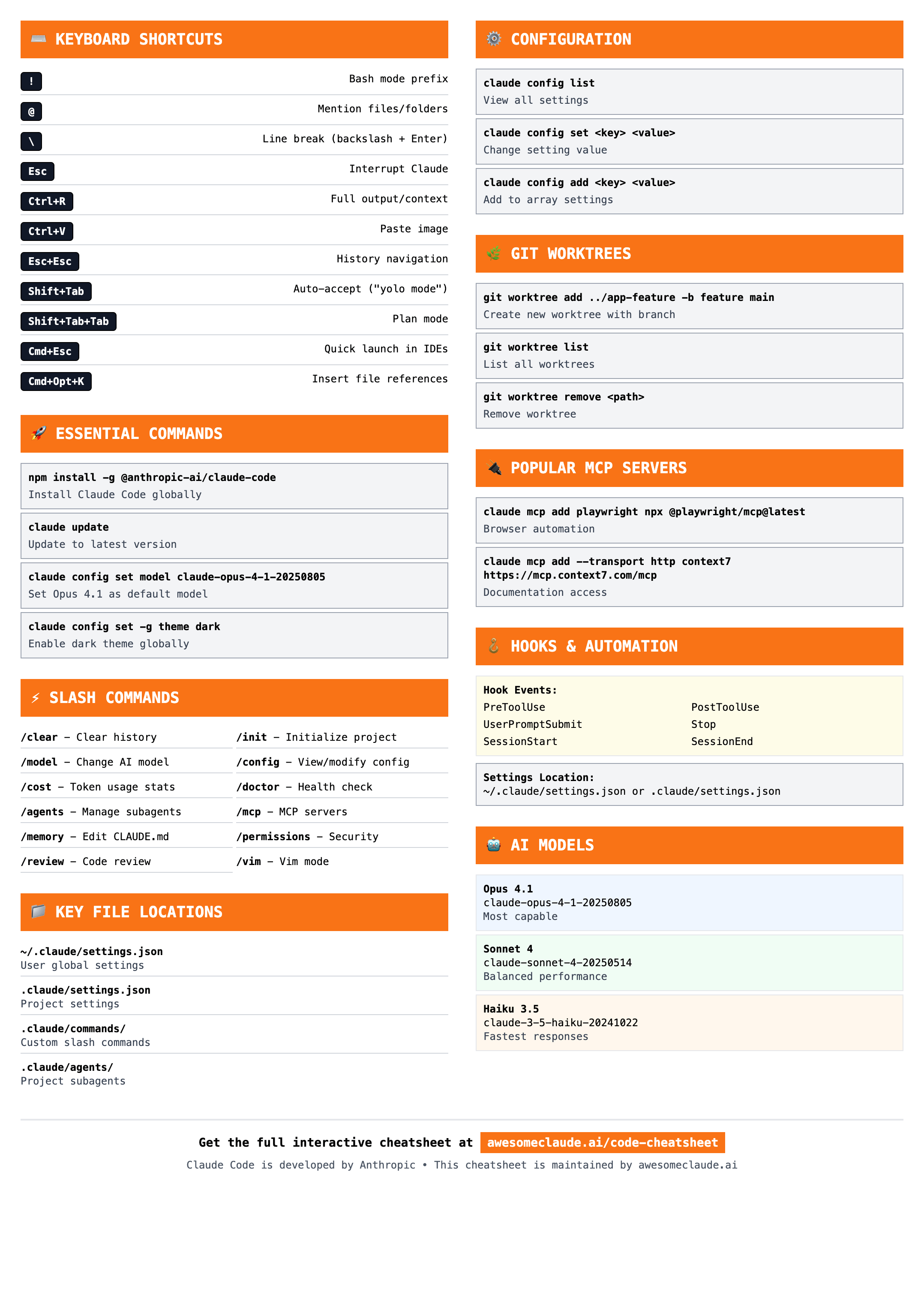
Printable Version
Special version for printing or keeping as a desktop reference. Contains all essential keyboard shortcuts, commands, configurations, and file locations in a compact format.
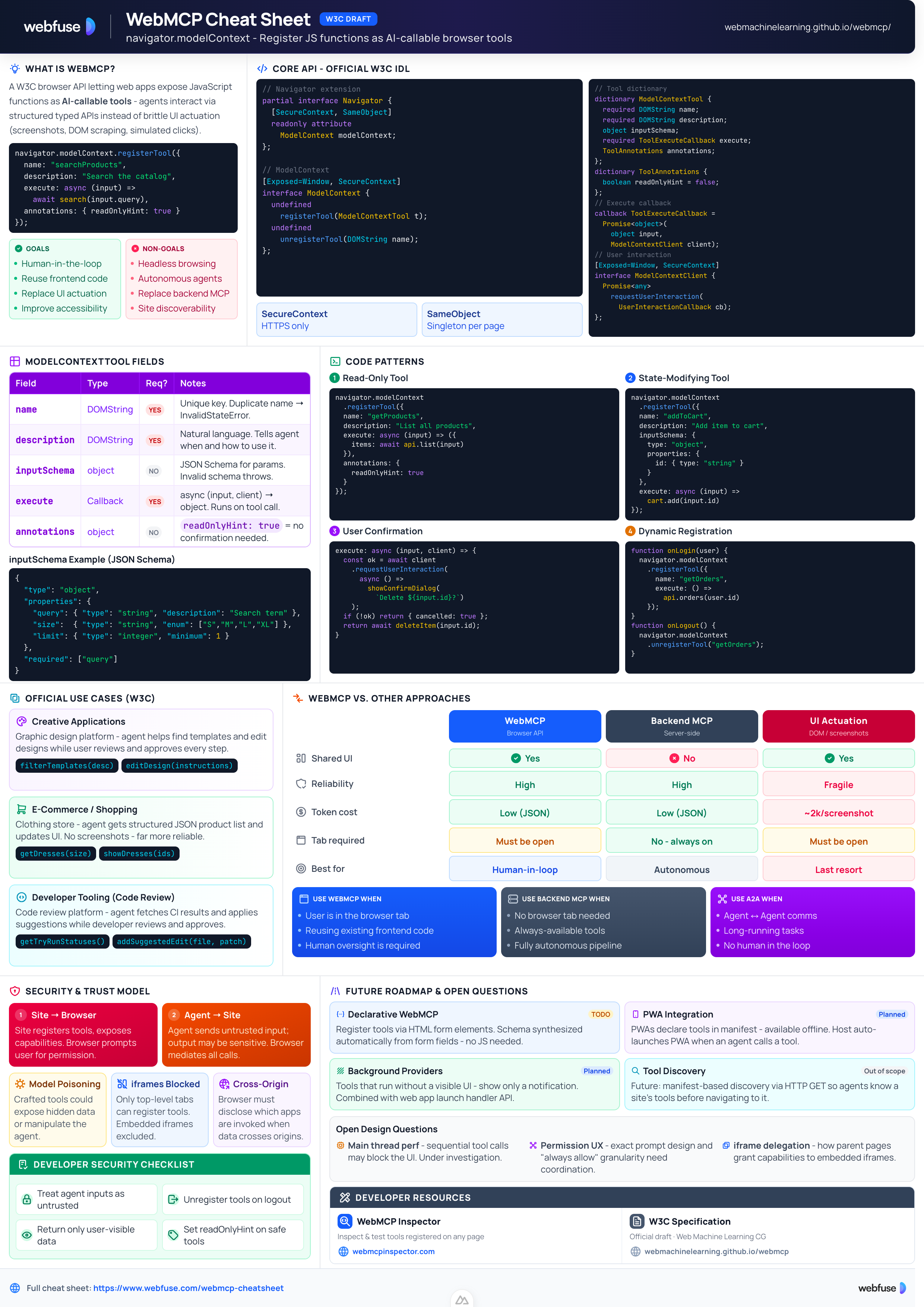
 Also check out
WebMCP Cheat Sheet W3C
Complete quick reference to the navigator.modelContext API - register JavaScript functions as AI-callable browser tools.